
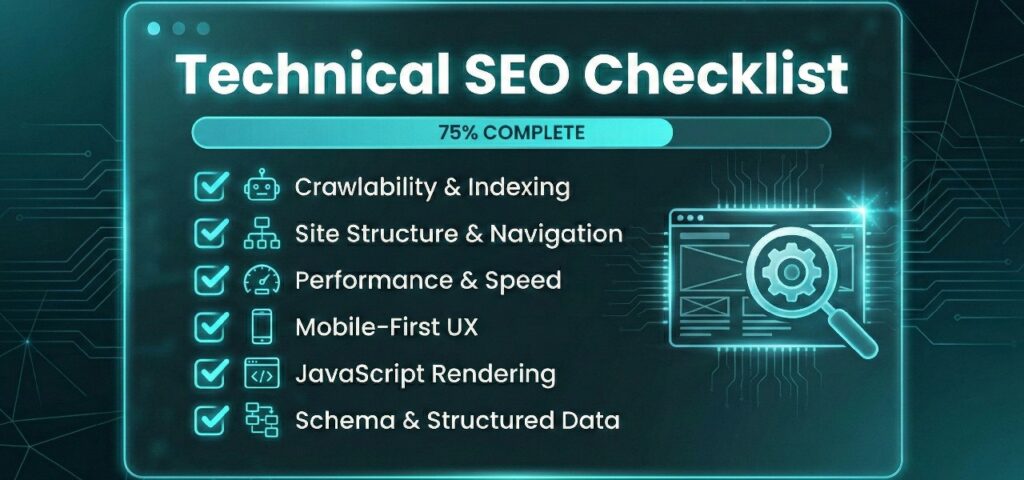
Search engines are smarter than ever, but they still rely on a solid technical foundation to find, understand, and rank your content. If your site structure is messy or your pages load slowly, even the best content strategy will fail to perform. That is why having a robust technical SEO checklist is non-negotiable for serious organic growth.
The digital landscape shifts rapidly. We have updated our internal processes to reflect the latest changes in search technology, ensuring you stay ahead of the curve. The technical SEO checklist 2026 edition focuses not just on fixing errors but on building an infrastructure that supports AI-driven search and mobile-first experiences.
At Occam Digital, we believe that technical excellence is the bedrock of performance. This guide covers everything from crawl budgets to JavaScript rendering so you can audit your site with confidence and precision.
Why a Technical SEO Checklist Matters (and What’s in It)
Technical SEO acts as the framework that supports every other marketing effort you make. You can publish high-quality content and earn authoritative backlinks, but if search engine bots cannot access your pages or understand your site architecture, those efforts will not translate into rankings. A comprehensive technical SEO audit checklist ensures that your website infrastructure communicates effectively with search engines like Google and Bing.
Many businesses assume their site is fine simply because it looks good to the user. However, underlying code issues, slow server responses, or improper indexing directives can remain invisible until traffic suddenly drops. We often see this disconnect when new clients approach us for technical SEO services; they have great products but a website that actively hinders search performance.
This checklist covers the essential pillars of a healthy site. We will examine crawlability to ensure bots can reach your content, indexability to make sure it appears in results, and user experience factors like page speed and mobile stability. By following a structured approach, you prevent critical errors and build a resilient platform for organic growth.
How to Use This 2026 Audit Checklist
A complete audit can feel overwhelming due to the sheer number of variables involved. We designed this technical SEO checklist to be modular so you can tackle it in stages rather than all at once. You do not need to fix every minor warning immediately. The goal is to prioritize issues that are actively preventing your site from ranking.
We recommend a triage approach. Start with the “Foundations” section to ensure Google can actually see your pages. Once the critical blockers are resolved, you can move to performance and advanced features. This method allows you to identify quick wins that provide an immediate boost to your visibility while you work on more complex, long-term fixes like Core Web Vitals or JavaScript rendering.
Treat this document as a living guide. Search algorithms change, and your site code evolves with every update. Revisiting these checks quarterly ensures that new content or development changes do not accidentally break your SEO performance.
Crawlability and Indexing Foundations
Importance: Ensures Google can access and index your content.
Complexity: Intermediate
Risks if Ignored: Pages may not appear in search results or be blocked entirely.
This is the starting point of any technical SEO checklist. If search engines cannot crawl your site, they cannot rank it. It is that simple. This section focuses on the pathways bots take to discover your URLs and the permissions you grant them to store that information.
1. Verify Crawlability and Indexing
The first step is checking the Index Coverage report in Google Search Console. You need to identify valid pages with errors and warnings. Look specifically for “Crawled – currently not indexed” and “Discovered – currently not indexed” statuses. These usually indicate quality issues or crawl bottlenecks. For those who want to master these diagnostic steps, our SEO course breaks down how to interpret these specific GSC signals in detail.
2. Manage Crawl Budget Efficiently
Crawl budget is the number of pages a search engine bot crawls on your site within a given timeframe. For large websites with thousands of pages, optimizing this is critical. You do not want Googlebot wasting resources on low-value query parameters, faceted navigation, or login pages. Use your server log files to see where bots are spending their time and block access to infinite spaces that dilute your crawl efficiency.
3. Ensure Robots.txt and XML Sitemap Accuracy
Your robots.txt file is the gatekeeper. It tells bots where they can and cannot go. A common mistake is accidentally blocking important resources like CSS or JavaScript files in this file, which prevents Google from rendering the page correctly.
Simultaneously, review your XML sitemap. It should only contain canonical, indexable URLs that return a 200 OK status code. Remove any redirects (3xx) or broken links (4xx) from your sitemap to keep the path to your content clean.
4. Confirm HTTPS and Canonical Tags Are Set
Security is a ranking signal. Ensure your SSL certificate is valid and that all HTTP traffic forces a redirect to the HTTPS version. Alongside security, you must implement self-referencing canonical tags on all core pages. This tag tells search engines which version of a URL is the “master” copy, preventing issues where parameters or tracking codes create perceived duplicates of your pages.
Site Structure and Navigation
Importance: Organizes content for discoverability and internal flow.
Complexity: Intermediate
Risks if Ignored: Missed link equity, user confusion, poor crawl efficiency.
Site architecture defines how link equity flows through your domain. If your structure is flat or disorganized, high-value pages may end up buried too deep for Google to value them. A logical hierarchy helps search engines understand the relationship between pages, establishing which content is most important.
5. Test Structured Navigation (Breadcrumbs, Menus)
Navigation menus should be intuitive and concise. Overloading the main menu with too many links can dilute the value passed to specific categories. Implement breadcrumb navigation on every page. This provides users with an easy way to backtrack and gives Google a clear understanding of the site hierarchy, which often results in enhanced snippets in search results.
6. Check for Orphan Pages
An orphan page is a URL that exists on your site but has no internal links pointing to it. Because crawlers discover pages by following links, orphan pages are often invisible to search engines unless they are in the sitemap. Use a crawler to identify these isolated pages. If the content is valuable, link to it from relevant category pages; if it is outdated, remove or redirect it.
7. Review Internal Linking Strategy
Internal linking is one of the most powerful tools in technical SEO. It connects your content clusters and signals topical authority. Ensure your high-authority pages (usually the home page or major service pages) link down to newer or deeper content to pass authority. We utilized this exact strategy during our work on SEO for financial services, where organizing complex product lines into clear, interlinked clusters significantly improved ranking signals for specific service terms.
Identify Technical Errors and Blockers
Importance: These prevent pages from working, indexing, or appearing in SERPs.
Complexity: Intermediate
Risks if Ignored: Broken site experience, crawl interruptions, negative SEO signals.
Technical errors are the friction that kills momentum. When a search bot encounters too many errors, it lowers the trust score of your domain and slows down the rate at which it crawls your pages. For users, a broken link is often the end of their journey on your site.
8. Identify and Resolve Broken Links and Redirect Loops
Broken internal links differ from external ones; they break the actual navigation path you built for the user. A robust technical SEO audit checklist prioritizes fixing these first to restore site flow.
Equally damaging are redirect chains and loops. A redirect chain occurs when Page A redirects to Page B, which then redirects to Page C. This forces the server to make multiple requests, slowing down load time and diluting link equity. A loop is worse: Page A redirects to Page B, which redirects back to Page A, causing the browser to crash.
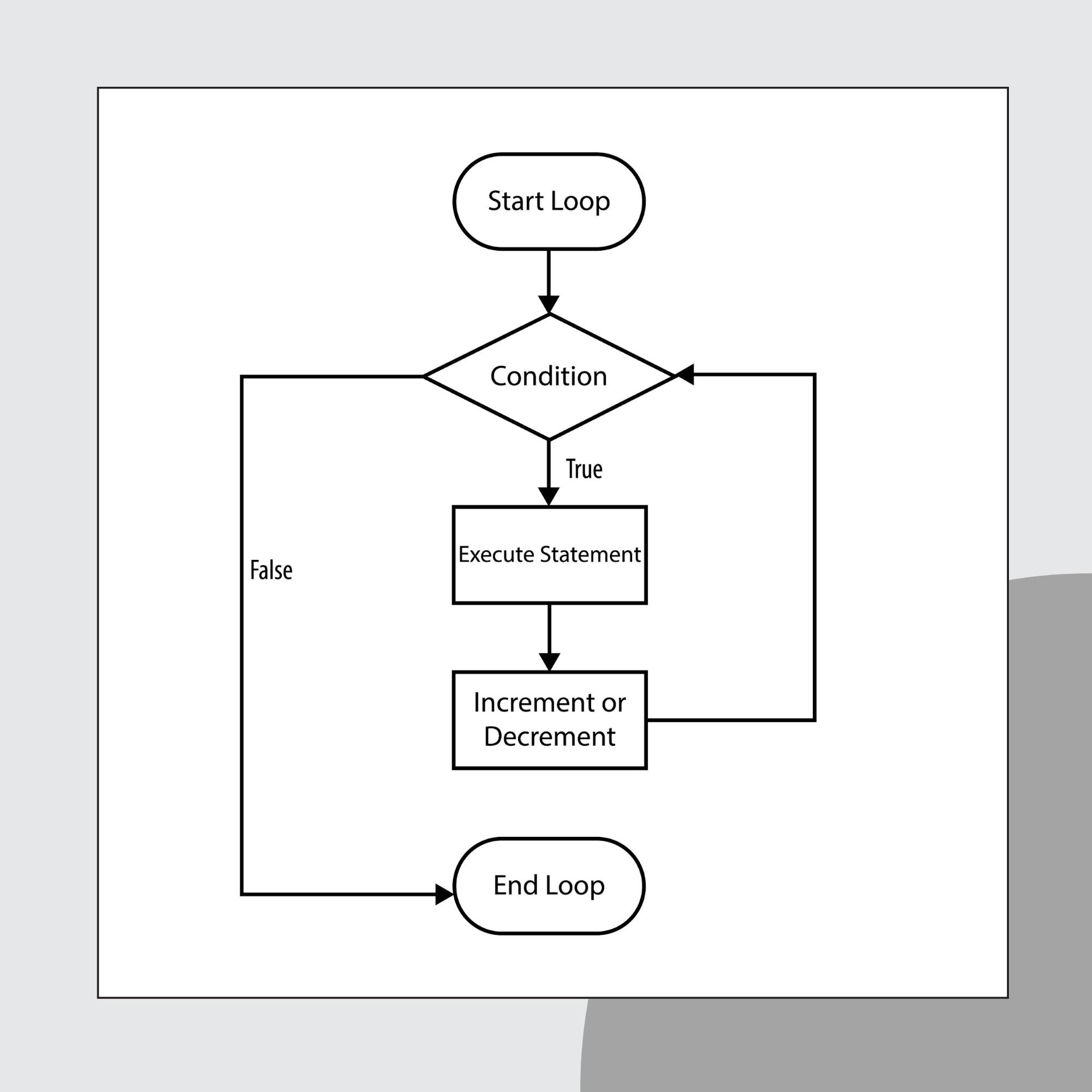
You must flatten these chains. Ensure that every redirect points directly to the final destination URL using a permanent 301 redirect.
9. Detect and Fix Server Errors (404, 500, etc.)
Status codes are the language your server uses to communicate with Googlebot. Understanding the nuances between them is vital for maintaining a healthy technical SEO checklist. A misconfigured code can cause Google to de-index a page you want to rank or waste crawl budget on pages you deleted years ago.
3xx Redirection Codes
- 301 (Moved Permanently): This is the gold standard for SEO. It tells the search engine that the page has moved forever and, crucially, transfers the ranking power (link equity) to the new URL.
- 302 (Found/Moved Temporarily): Use this only if you intend to bring the original page back soon (e.g., a temporary sale page).
Use 301 for permanent moves and 302 for temporary ones. Google increasingly treats 30x redirects similarly for passing signals, but using the correct type helps it understand your intent and avoid indexing the wrong URL.
4xx Client Errors
- 404 (Not Found): It is normal for old pages to die. However, if a page has external backlinks, letting it 404 breaks that link equity chain. Redirect these to a relevant category or product.
- 410 (Gone): This is a “stronger” 404. It tells Google the content is permanently deleted and will never return. This encourages Google to de-index the URL faster than a standard 404.
- Soft 404: This occurs when a page displays an error message to the user (like “Product Not Found”) but sends a “200 OK” status code to the bot. This is a technical failure; it tricks Google into crawling and indexing empty pages, wasting your crawl budget.
5xx Server Errors
- 500 (Internal Server Error): A generic “something went wrong” message. It often relates to database connection issues or PHP errors.
- 503 (Service Unavailable): Use this status code during scheduled maintenance. It tells Google, “We are down right now, but please come back later,” preventing the bot from de-indexing your site during temporary downtime.
Performance and Speed Optimization
Importance: Page speed affects UX, SEO rankings, and crawl depth.
Complexity: Advanced
Risks if Ignored: Poor rankings, lower engagement, higher bounce rates.
In the 2026 search landscape, speed is no longer a nice-to-have; it’s a meaningful ranking signal. Google increasingly rewards sites that deliver content quickly and smoothly. If your site lags, users bounce, and those engagement signals tell Google your site is not worth ranking.
10. Improve Core Web Vitals (LCP, INP, CLS)
Core Web Vitals are the specific metrics Google uses to measure the user experience. While the heading mentions FID (First Input Delay), it is crucial to note that as of 2024, Google replaced FID with INP (Interaction to Next Paint) as the standard responsiveness metric. For your 2026 audit, you must optimize for INP.
- LCP (Largest Contentful Paint): Measures loading performance. The main element of the page (hero image or heading) must load fast.
- INP (Interaction to Next Paint): Measures responsiveness. How quickly does the page react when a user clicks a button?
- CLS (Cumulative Layout Shift): Measures visual stability. Elements should not jump around as the page loads.
2026 Core Web Vitals Benchmarks Table
| Metric | Good (Green) | Needs Improvement (Yellow) | Poor (Red) |
| LCP | ≤ 2.5s | 2.5s – 4.0s | ≥ 4.0s |
| INP | ≤ 200ms | 200ms – 500ms | ≥ 500ms |
| CLS | ≤ 0.1 | 0.1 – 0.25 | ≥ 0.25 |
11. Optimize Images and Compression
Images are often the heaviest elements on a page. Ensure every image is compressed without losing quality. We recommend serving images in next-gen formats like WebP or AVIF, which offer superior compression compared to JPEG or PNG. Additionally, always specify explicit width and height attributes to prevent CLS issues caused by the browser not knowing how much space to allocate for an image before it loads.
12. Minimize JavaScript, CSS, and HTTP Requests
Every script your site loads requires a DNS lookup, a TCP handshake, and a download. Reducing the number of these requests is vital. Minify your CSS and JavaScript files to remove unnecessary whitespace and comments. Where possible, combine small files to reduce the total number of HTTP requests. If you have unused CSS from a pre-bought theme, strip it out.
13. Implement Browser Caching and Lazy Loading
Browser caching stores static files (like your logo or stylesheets) on the user’s device so they do not need to be downloaded again on subsequent visits. This drastically improves load times for returning visitors.
Simultaneously, implement lazy loading for images and videos. This technique defers the loading of off-screen resources until the user scrolls down to them. This ensures the browser can focus all its resources on painting the visible part of the page (the viewport) first, improving your LCP score.
Mobile and UX Technical Requirements
Importance: Core to mobile-first indexing and search rankings.
Complexity: Intermediate
Risks if Ignored: Mobile penalties, high bounce rates, poor usability.
Since Google switched to mobile-first indexing, the desktop version of your site is effectively secondary. Googlebot crawls the web acting as a smartphone user. If your mobile experience is clunky, slow, or missing content compared to the desktop version, your rankings will suffer across all devices.
14. Ensure Mobile-Friendliness and Responsive Design
Responsive design is no longer optional; it is the industry standard. Your site should adapt fluidly to any screen size without requiring a separate “m.” subdomain. A separate mobile site often creates split-URL issues and complicates your canonical strategy.
For your technical SEO audit checklist, verify the following via Google’s Mobile-Friendly Test:
- Viewport Configuration: Ensure the <meta name=”viewport”> tag is present and correctly configured so content scales to the device width.
- Touch Targets: Buttons and links must be large enough to be tapped easily. If elements are too close together, users will misclick, signaling poor UX to Google.
- Content Parity: Ensure that the mobile version contains the same valuable content, structured data, and meta tags as the desktop version. Hiding content on mobile for “design” reasons can prevent that content from being indexed.
15. Avoid Intrusive Interstitials and Popups
Aggressive popups are a major friction point. Google explicitly penalizes pages where content is not easily accessible to a user on the transition from the mobile search results.
This does not mean you cannot use popups, but timing and sizing matter.
- The Penalty: Avoid popups that cover the main content immediately after the user lands on the page.
- The Safe Zone: Interstitials for legal obligations (age verification, cookie usage) are exempt. For marketing popups, use banners that take up a reasonable amount of screen space or trigger them only after the user has engaged with the content (e.g., scrolled 50% of the page).
JavaScript and Rendering Validation
Importance: JS can prevent Google from seeing or indexing your content.
Complexity: Advanced
Risks if Ignored: Content won’t show in SERPs, functionality may break.
Modern web development relies heavily on JavaScript frameworks like React, Angular, and Vue. While these create dynamic user experiences, they introduce a significant challenge for search engines. If your content is injected via JavaScript on the client side, Googlebot might see a blank page during its initial crawl.
16. Test JavaScript-Rendered Content with GSC and Tools
Google processes JavaScript in two waves: the initial crawl (HTML only) and the rendering phase (executing JS). This second phase can be delayed from minutes to weeks depending on resource availability.
To check what Google actually sees, use the URL Inspection Tool in Google Search Console. Click “Test Live URL” and then “View Tested Page” > “Screenshot”. If the screenshot is missing core content that you see in your browser, your JavaScript is not rendering correctly for the bot.
For a site-wide check, use crawlers like Screaming Frog with “JavaScript Rendering” enabled. Compare the HTML in the “original source” vs. “rendered HTML”. If links or text only appear in the rendered version, you are relying on Google’s rendering queue, which is risky for SEO stability.
17. Identify Rendering Errors Affecting Indexing
Even if Google tries to render your page, technical roadblocks can stop it.
- Timeouts: Googlebot has a limited time budget to render a page. If your API calls or scripts take too long, the bot will leave before the content loads.
- Inaccessible Links: A common pitfall in Single Page Applications (SPAs) is using <div> or <button> elements with onclick events for navigation instead of standard <a> tags with href attributes. Googlebot does not “click” buttons; it only follows links. If your navigation relies on clicks, your internal pages may become invisible orphan pages.
- Blocked Resources: As mentioned in the foundations section, ensure your robots.txt is not blocking the API endpoints or JS files required to build the page content.
International and Multilingual SEO Setup
Importance: Targets content to the right regions and languages.
Complexity: Advanced
Risks if Ignored: Content mismatch by market; hreflang issues.
For global brands, serving the correct content to the correct user is a massive technical challenge. Without explicit instructions, Google struggles to differentiate between an English page for the UK and an English page for the US. This often leads to the wrong version ranking or, worse, both versions competing against each other as duplicate content.
18. Set Up Hreflang Tags Properly
Hreflang tags are the signal you send to search engines to specify the language and geographical targeting of a page.
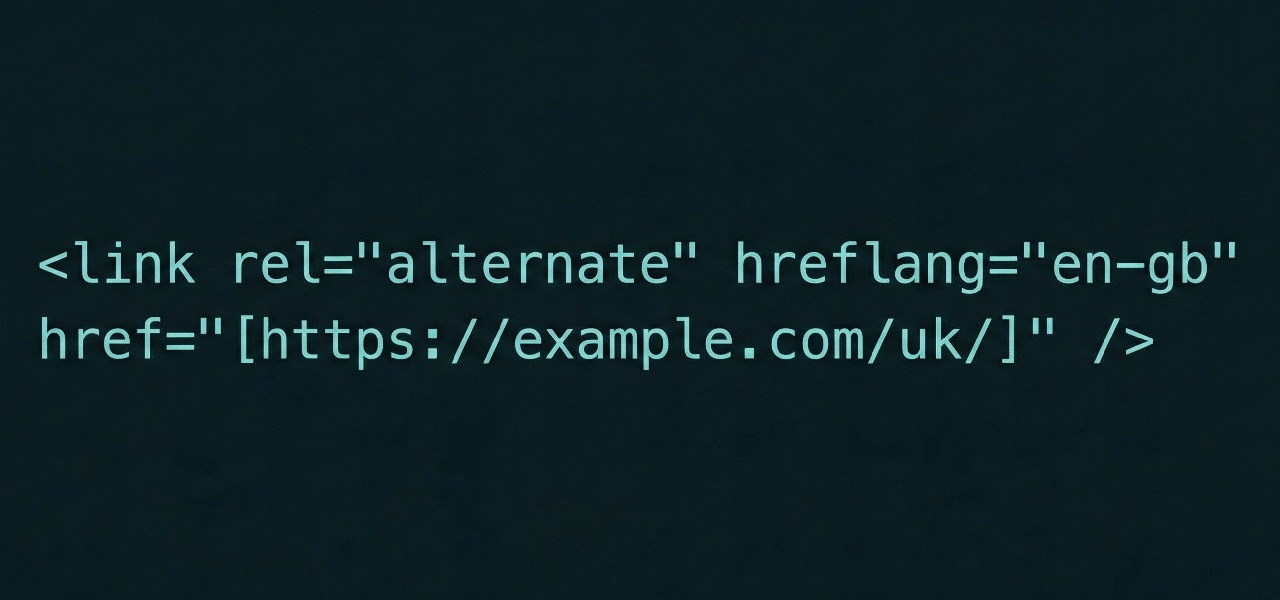
In your technical SEO checklist, you must validate three things regarding hreflang:
- Reciprocity: If Page A links to Page B as an alternate, Page B must link back to Page A. If the link is one-way, Google ignores the tag entirely.
- Self-Referencing: The page must list itself in the hreflang attributes as well as the alternates.
- X-Default: Where you have a global fallback (often your homepage or language selector), include an hreflang=\”x-default\” entry as the default option for users whose browser settings do not match any of your specific language variants, ensuring they land on a generic (usually global) version of the page.
19. Confirm Geo‑targeting Settings in GSC
Google has deprecated the old International Targeting report and country-targeting setting in Search Console, so hreflang and localized content now do most of the heavy lifting. Monitoring your geographic performance remains vital. Use the Performance report in GSC and filter by “Country.”
If you are using a generic top-level domain (gTLD) but intend to target a specific country (e.g., France), and you see the majority of your impressions coming from Canada or Belgium, your hreflang implementation or content localization is failing. Conversely, if you use a country-code top-level domain (ccTLD) like .de or .co.uk, Google automatically associates your site with that region. You should verify that this automatic association is not limiting your visibility in broader markets if your goal is global reach.
Schema and Structured Data Validation
Importance: Supports rich results and clarifies meaning to search engines.
Complexity: Intermediate
Risks if Ignored: Missed rich snippets, inaccurate representation in SERPs.
Search engines are good at reading text, but they struggle to understand context without help. Structured data acts as a translator, explicitly telling Google, “This string of numbers is a price,” or “This date is an event start time.” Implementing this correctly is the key to unlocking rich results: those eye-catching stars, images, and FAQs that appear directly in search results.
20. Add JSON-LD Markup for Key Content Types
While there are multiple ways to add schema (like Microdata), Google explicitly prefers JSON-LD (JavaScript Object Notation for Linked Data). It is cleaner, easier to debug, and injects data without cluttering your HTML code.
For your technical SEO checklist 2026, prioritize these core schema types:
- Organization Schema: Establishes your brand logo, social profiles, and contact info in the Knowledge Graph.
- BreadcrumbList: Helps Google display your URL path clearly in SERPs.
- Article/BlogPosting: Essential for news and blog content to appear in Google Discover.
- Product: Vital for e-commerce to display price, availability, and review ratings.
Correctly implemented schema is often the deciding factor in winning position zero, allowing your content to bypass competitors and appear at the very top of the page as a Featured Snippet.
21. Use Tools to Validate Schema Errors
Adding code is only half the battle; syntax errors can render your markup useless. Google’s parsers are unforgiving—a missing comma or unclosed bracket means the data is ignored.
Always test your code before deploying. Use the Rich Results Test to see which rich snippets your page is eligible for. Once the code is live, monitor the “Enhancements” tab in Google Search Console. It provides a persistent feed of validity warnings, alerting you if a required field (like price or author) is missing from your structured data.
Content-Specific Technical Fixes
Importance: Improves technical quality and uniqueness of content.
Complexity: Intermediate
Risks if Ignored: Cannibalization, thin content penalties, lower crawl priority.
Content issues are often viewed as purely editorial, but they have a massive technical impact. If you have thousands of low-quality pages, you dilute your site’s overall authority score. Search engines have limited patience; they want to find high-value content quickly without wading through near-duplicates or empty shells.
22. Detect and Eliminate Duplicate Content
Duplicate content confuses search engines. When Google sees identical content on two different URLs, it does not know which one to rank, so it often ranks neither.
- Technical Duplicates: These are caused by CMS issues, such as serving the same page via http and https, or www and non-www. Ensure your server forces a redirect to a single version.
- URL Parameters: E-commerce sites often generate duplicates via filters (e.g., ?color=red&sort=price). configure URL parameters in GSC or use canonical tags to point these variations back to the main category page.
23. Audit Thin Pages and Improve Relevance
“Thin content” refers to pages with little or no value to the user. This includes empty category pages, auto-generated tag archives, or “doorway pages” created solely to target specific keywords without offering substance.
Run a crawl of your site and filter for pages with low word counts (e.g., under 200 words). You generally have three options:
- Beef it up: Add unique, helpful content if the page serves a distinct user need.
- Consolidate: If you have five short articles on the same topic, merge them into one authoritative guide and 301 redirect the old URLs.
- Noindex: If the page must exist for utility (like a login page) but offers no search value, add a <meta name=”robots” content=”noindex”> tag.
24. Ensure Meta Tags Are Present and Unique
Your title tags and meta descriptions are your first interaction with a potential customer in the search results. From a technical standpoint, every indexable page must have a unique title and description.
Title Tags: Verify they are within pixel limits (roughly 60 characters) so they do not truncate.
Meta Descriptions: While not a direct ranking factor, they drive Click-Through Rate (CTR). A missing meta description allows Google to pull random text from the page, which is often less persuasive. Use a crawler to identify duplicate descriptions, which often indicate that a template is failing to pull unique data for specific pages.
Technical Tracking & Analytics Checks
Importance: Data integrity enables ROI tracking and continuous improvement. Complexity: Intermediate Risks if Ignored: Missed goals, conversion tracking errors, bad decisions.
One of the most painful realizations in SEO is discovering that your traffic increased, but you have no idea if it led to sales because the tracking code fell off. A technical SEO audit checklist must include a verification of your data collection tools. Without accurate data, you are flying blind.
25. Validate Google Analytics & Tag Manager Setup
By 2026, Google Analytics 4 (GA4) is the established standard, but implementation errors remain common.
- Code Placement: Ensure the Google Tag Manager (GTM) container snippets are placed correctly. The script part should be as high in the <head> as possible, and the noscript part immediately after the opening <body> tag.
- Duplicate Tags: Use the Google Tag Assistant browser extension to check for double-tagging. If you have the GA4 configuration tag firing via GTM and a hardcoded gtag.js on the page, you will record every visit twice, inflating your metrics artificially.
- Cross-Domain Tracking: If your user journey spans multiple domains (e.g., from your main site to a third-party booking engine), verify that the session does not break. If it breaks, the original traffic source (Organic Search) is lost and replaced with “Direct” or “Referral.”
26. Confirm Conversion Tracking and Event Firing
Traffic is vanity; conversions are sanity. You need to ensure that the actions driving revenue are actually being recorded.
- Test Forms and Checkout: Manually submit a contact form or complete a test purchase. Use the “DebugView” in GA4 or the “Preview” mode in GTM to watch the event fire in real-time.
- Data Layer Integrity: For e-commerce, ensure your Data Layer is populating correctly with product values and transaction IDs. If the Data Layer breaks during a site update, your revenue reporting in Analytics will flatline even if sales are happening in the backend.
Optimizing Technical SEO for AI and Language Models
Importance: LLMs now surface and synthesize SEO content for users. Don’t be invisible.
Complexity: Intermediate
Risks if Ignored: Missed citation in AI summaries, lost authority and traffic.
The search landscape of 2026 is increasingly shaped by generative AI results – sometimes called Generative Engine Optimization (GEO). Users are increasingly receiving direct answers synthesized by AI (like Google’s AI Overviews or ChatGPT) rather than clicking through ten blue links. If your technical foundation does not feed these language models clean, structured information, your brand will be excluded from the conversation.
27. Structure Your Content for Answer Clarity
Language models are prediction engines. They favor content that follows a logical, predictable structure. To optimize for this, adopt a “Bottom Line Up Front” (BLUF) approach. When answering a question, state the direct answer immediately in the first sentence before expanding on the details. This increases the probability that an AI will cite your text as the definitive answer.
28. Use Schema and Precise Headings for AI Parsing
We cannot overstate the importance of structured data here. While humans read text, machines rely on Schema to understand relationships between entities.
Ensure your nested heading structure (H1 > H2 > H3) is semantic and descriptive. Vague headings like “More Info” confuse models. Instead, use specific headings like “Benefits of Technical SEO Audits” to clearly label the section’s topic for the parser.
29. Monitor Mentions in AI Summaries (Google SGE, ChatGPT, etc.)
Traditional rank tracking is no longer enough. You must monitor how often your brand or content is cited in AI-generated summaries. While tools for this are still maturing, manual spot-checks on key navigational and informational queries are essential. If you are ranking in the top 3 organic results but missing from the AI summary, your content structure may be too complex or unstructured for the model to summarize easily.
30. Create Snippet-Ready Definitions and How-Tos
AI models thrive on definitions and step-by-step instructions. Explicitly defining concepts (e.g., “A canonical tag is…”) within your content increases the likelihood of being picked up. This overlaps significantly with strategies for capturing position zero, where concise, factual formatting wins the prime real estate at the top of the SERP.
Bonus: Technical SEO Tools to Speed Up Your Audit
Importance: Accelerates auditing and ensures deeper coverage.
Complexity: Beginner–Intermediate
Risks if Ignored: Manual audits are slower, risk human error, and miss details.
You cannot audit a 5,000-page website manually. To execute this technical SEO checklist effectively, you need tools that simulate how search engines experience your site. These tools allow you to spot patterns and aggregate data that would be impossible to see by clicking through pages one by one.
31. Site Crawlers (Screaming Frog, Sitebulb, etc.)
These are the heavy lifters of any audit.
- Screaming Frog SEO Spider: The industry standard. It crawls your site link-by-link, returning data on status codes, meta tags, headers, and more. It is perfect for spotting broken links and redirect chains in bulk.
- Sitebulb: Offers similar crawling capabilities but with a focus on data visualization. It provides “Hints” that prioritize issues for you, which is excellent if you are newer to technical SEO.
32. Performance Testing (PageSpeed Insights, Lighthouse)
Google provides these free tools to measure your Core Web Vitals.
- PageSpeed Insights (PSI): Provides both “Lab Data” (simulation) and “Field Data” (real user metrics from the Chrome User Experience Report). Field data is what actually impacts your rankings.
- Lighthouse: Built into Chrome DevTools. It is great for testing changes in a staging environment before they go live, allowing developers to validate fixes instantly.
33. Structured Data Checkers and Indexing Tools
- Schema Markup Validator: The successor to Google’s Structured Data Testing Tool. It validates syntax for Schema.org standards.
- Rich Results Test: As mentioned earlier, this Google tool specifically checks if your code qualifies for rich snippets (stars, recipes, jobs) in search results.
- Google Search Console (GSC): The source of truth. No other tool can tell you exactly how Google is indexing your site right now. It is indispensable for monitoring crawl stats and index coverage.
Final Steps: Running Your Audit and Prioritizing Fixes
Importance: Execution is everything. A checklist is only valuable when used.
Complexity: Intermediate
Risks if Ignored: Known issues remain unresolved, no SEO gains realized.
Collecting data is satisfying, but it does not improve rankings. The value of a technical SEO checklist lies in the implementation of fixes. We often see audits sit in inboxes for months because the list of errors looks insurmountable. The secret is not to fix everything at once, but to fix the right things in the right order.
Step-by-Step: How to Run a Technical SEO Audit
Step 1: Log Issues by Type and Severity
Do not treat a missing meta description with the same urgency as a site-wide noindex tag. Export your crawl data into a spreadsheet and categorize every issue. We recommend a simple traffic light system:
- Critical (Red): Issues preventing indexing (e.g., 500 errors, robots.txt blocks). Fix these immediately.
- Important (Yellow): Issues affecting user experience or click-through rates (e.g., Core Web Vitals, duplicate title tags). Schedule these for the next sprint.
- Low Priority (Green): Housekeeping items (e.g., optimizing alt text for decorative images). Tackle these when resources allow.
Step 2: Assign Fixes to Dev/SEO Teams
Once prioritized, translate the issues into developer-friendly tasks. A developer does not need to know why a canonical tag matters for technical SEO; they just need to know where to put it and what the logic should be. Create clear tickets (in Jira, Trello, or Asana) with reproduction steps and the expected outcome. This minimizes back-and-forth and ensures the fix is implemented correctly the first time.
Step 3: Monitor, Re-Test, and Repeat
SEO is not a “set and forget” discipline. Once a fix is deployed, you must verify it.
- Re-crawl: Run your crawler on the specific URLs to confirm the error is gone.
- Validate in GSC: Use the “Validate Fix” button in Google Search Console. This signals Google to prioritize recrawling those specific pages.
- Monitor: Watch your organic traffic and index status for two weeks to ensure no negative side effects occurred (regression testing).
Need Help With Technical SEO? Here’s How Occam Digital Can Support You
Auditing a website is a rigorous process. While this technical SEO checklist gives you the roadmap, executing it on a large or complex site requires time, specialized tools, and deep expertise. If you are seeing traffic drops or struggling to get your content indexed, you might need more than just a checklist. You might need a partner.
Our team at Occam Digital lives and breathes technical search. We do not just run automated reports; we dig into the code, analyze log files, and fix the structural issues that hold businesses back. Whether you need a one-time deep dive or ongoing support to navigate the complexities of AI-driven search, we are ready to help.
FAQ: Technical SEO Checklist Essentials
How long does a technical SEO audit take?
For small to mid-sized sites, a thorough audit typically takes 5–10 business days. Large enterprise or e-commerce sites often require 3–4 weeks to account for crawling depth, manual code verification, and roadmap creation.
Can I do a technical SEO audit myself or should I hire an agency?
You can handle basics like broken links yourself using standard tools. However, for complex issues like JavaScript rendering, international hreflang setups, or server performance, hiring an agency ensures accuracy and prevents costly technical mistakes.
What tools do I need to run this checklist?
At a minimum, use Google Search Console and Analytics for data. For crawling, Screaming Frog or Sitebulb is essential. Use PageSpeed Insights for performance testing. These core tools cover the vast majority of audit requirements.
How often should I perform a technical SEO audit?
Run a full technical audit annually or during major site migrations. Additionally, perform quarterly “health checks” to catch critical errors like 404s or indexing blockers before they impact your rankings.
What are the biggest mistakes people make with technical SEO?
Common mistakes include prioritizing automated tool scores over manual validation, neglecting mobile-specific issues, and accidentally blocking critical resources via robots.txt. Never assume a “green score” means your site is actually error-free.